
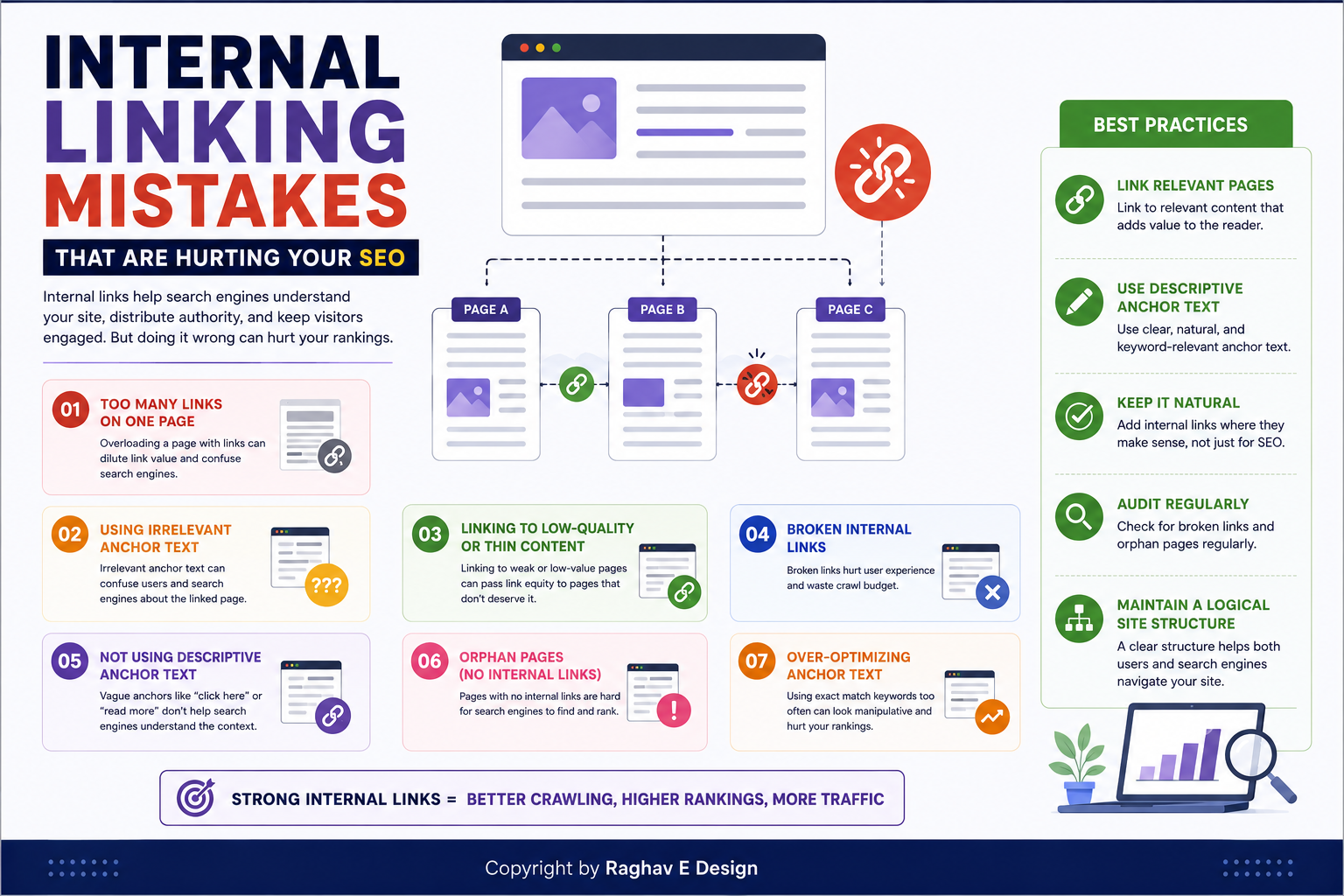
Introduction
You publish great content, optimize your keywords, and still watch your rankings stall. The reason often has nothing to do with your writing quality. It comes down to how your pages connect to one another. Internal linking mistakes are among the most overlooked reasons a website underperforms in search results, and most business owners never think to check for them. Search engines rely on internal links to understand which pages matter most on your site, and readers rely on them to find related information without hitting a dead end. When those links are missing, broken, or poorly placed, both search engines and visitors struggle to navigate your content the way you intended. This article walks through the most common internal linking mistakes, why they matter, and how to fix them so your site structure works in your favor instead of against you.
What Is Internal Linking?
Internal linking refers to the practice of connecting one page on your website to another page on the same domain using a clickable hyperlink. Unlike external links, which point to other websites, internal links keep visitors moving through your own content. A blog post that links to a service page, a homepage that links to a product category, or a footer that links to your contact page are all examples of internal linking in action.
Search engines use these links to crawl and index your site. They also use the number and context of internal links pointing to a page as a signal of that page's relative importance. A page with many relevant internal links pointing to it is generally treated as more significant than an orphaned page with none.
Why Internal Linking Mistakes Matter
Poor internal linking does not just affect search rankings. It affects how long visitors stay on your site, how many pages they view per session, and whether they eventually convert into leads or customers. A well-linked site guides visitors naturally from an informational blog post toward a relevant service page, which supports both user experience and business goals.
When internal linking is neglected, search engines may struggle to discover newer pages, important pages may receive little authority from your homepage, and visitors may leave your site after reading a single article simply because there was nothing else offered to them.
Common Internal Linking Mistakes
1. Orphaned Pages With No Internal Links
An orphaned page is one that has no internal links pointing to it from anywhere else on your site. If a page can only be found through the sitemap or direct URL entry, search engines may rarely crawl it, and visitors will never stumble upon it naturally. This is especially common with older blog posts that get published and then forgotten.
2. Overusing Generic Anchor Text
Anchor text is the clickable text of a link. Phrases like "click here" or "read more" tell readers and search engines almost nothing about the destination page. Descriptive anchor text, such as "learn how Google Ads targeting works," gives both users and search engines useful context about what to expect.
3. Linking Only to the Homepage
Many websites link every internal reference back to the homepage out of habit. This wastes an opportunity to distribute authority to deeper, more specific pages such as service pages, category pages, or high-value blog content that actually needs the visibility.
4. Too Many Links on a Single Page
Stuffing a page with dozens of internal links dilutes the value each link carries and can overwhelm readers. A cluttered page with excessive linking often signals low-quality content rather than helpful navigation.
5. Ignoring Broken Internal Links
Pages get deleted, URLs get changed, and slugs get updated during redesigns. If internal links are not updated alongside these changes, visitors land on 404 error pages, which damages both user trust and crawl efficiency.
6. No Clear Site Hierarchy
Websites without a logical structure, where category pages link to relevant subpages and subpages link back to categories, make it difficult for search engines to understand which pages are foundational and which are supplementary.
Best Practices for Internal Linking
Start by mapping out your most important pages, often called pillar pages, and make sure your blog content links back to them naturally. Use descriptive, keyword-relevant anchor text without forcing it. Keep the number of internal links on a page reasonable, generally guided by what genuinely helps the reader rather than an arbitrary count. Audit your site periodically for broken links using a crawling tool, and fix them promptly. Structure your content in topic clusters, where a central guide links out to detailed subtopics, and those subtopics link back to the guide.
Practical Tips
- Add two to four contextual internal links within the body of every new blog post you publish.
- Revisit older articles every few months and add links to newly published, relevant content.
- Use breadcrumb navigation to reinforce site hierarchy for both users and search engines.
- Avoid linking the same anchor text to different destination pages, as this creates confusion about which page should rank for that phrase.
- Prioritize linking to pages that support your business goals, such as service pages, alongside purely informational content.
Common Mistakes to Avoid
Beyond the issues already covered, many site owners forget to check internal links after a website redesign or domain migration, leaving hundreds of broken paths behind. Others focus entirely on external backlinks while ignoring the internal structure that determines how that authority flows through the site. Treating internal linking as a one-time task rather than an ongoing part of content strategy is one of the most common long-term mistakes.
Frequently Asked Questions
How many internal links should a blog post have? There is no fixed number, but most well-optimized blog posts include somewhere between three and eight internal links, placed naturally within the content where they genuinely help the reader.
Do internal links really affect SEO rankings? Yes. Internal links help search engines discover and understand the relationship between pages, and they help distribute ranking authority across your site, which can influence how individual pages perform.
What is the difference between internal and external links? Internal links point to other pages within the same website, while external links point to pages on different domains. Both play a role in SEO, but they serve different purposes.
Should I link to the same page more than once in an article? It is generally better to link to a specific page once within the main body of an article using the most relevant anchor text, rather than repeating the same link multiple times.
How do I find broken internal links on my website? Website crawling tools can scan your entire site and generate a report of broken or redirected internal links, which you can then update manually or through a redirect.
Can too many internal links hurt my SEO? Excessive internal linking can dilute the value passed to each linked page and create a poor reading experience, so links should always be added with purpose rather than volume in mind.
What are orphaned pages and why are they a problem? Orphaned pages are pages with no internal links pointing to them. They are harder for search engines to discover and rank, and visitors are unlikely to find them through normal site navigation.
Conclusion
Internal linking is one of the simplest SEO elements to control, yet it remains one of the most frequently mismanaged. Fixing orphaned pages, replacing generic anchor text, repairing broken links, and building a clear site hierarchy can meaningfully improve how search engines crawl your website and how visitors experience your content. These internal linking mistakes are rarely dramatic on their own, but together they quietly limit how far your content can reach. If reviewing your site's internal link structure feels overwhelming or time-consuming, Raghav E Design can help assess your website and put a stronger structure in place as part of a broader SEO strategy.
If your website's internal links are scattered, broken, or missing entirely, it may be quietly holding back your search visibility. Raghav E Design offers website development, SEO, and performance marketing services designed to fix structural issues like this and help your site perform the way it should. Reach out to Raghav E Design to have your website's internal linking and overall SEO reviewed by a team that understands what search engines and real visitors are looking for.